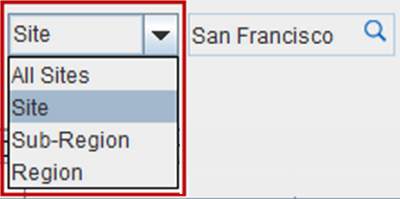
Site filter is provided at the extreme right side of the window using which the orders, events, items, labor and projects can searched based on sites.
Clicking on the drop-down arrow displays a drop-down menu.
The drop-down menu has the following submenu options
|
Field Name |
Description |
|
All Site |
Selecting this option will display orders, events, items, labor projects of all the Sites, Sub-Regions and Regions. |
|
Site |
Selecting this option will display orders, events, items, labor projects of the selected Site. |
|
Sub-Region |
Selecting this option will display orders, events, items, labor projects of the selected Sub-Region. |
|
Region |
Selecting this option will display orders, events, items, labor projects of the selected Region Clicking on the ellipses button will open the Site Master Dialog where from which Site/Sub-Region/Region can be selected for filtering. |