Application Settings
Content was last updated in 06.01.13-00
The options window of the R2Images mobile app, is basically the nerve center of the app itself.
Most of the functions that you would do using the mobile app can be configured or managed through this page.
Ideally, the settings are required to be done, just once while setting up the application on your mobile device. However, you can always change them later anytime it is needed.
Following are the options available for you in the settings page.
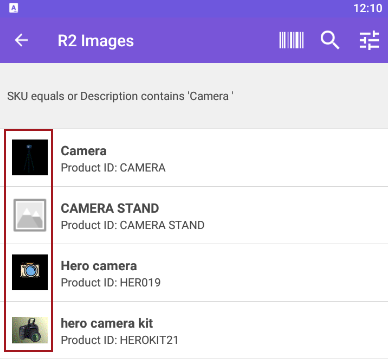
Show Thumbnails: Tap the toggle button to view the concise image of a product as shown here. Otherwise, tap again to disable it.
If the image is not available for a product, then it displays an empty image.
Image Carousel Loop: Tap the toggle button to view the images uploaded to a product in a loop. Otherwise, tap again to disable it.
Account: Displays the 'Host name' and 'Username' information in read-only mode.
Log Out: Click Log Out to exit from the application.