Reference No: AHI-10
Version No: 06.01.03-00
Details
Support to print Exchange Rate (1/Site Currency to Transaction Currency) in the Invoice Prints based on as applicable for date set in the Invoice UDF , named Exchange Rate Date.
Notes:
This is supported only when Multi-currency =TRUE.
The calculation for Exchange Rate to display in Invoice print= 1/Site Currency,
|
CID |
Description |
Applicable Forms |
|
1280 |
Print Exchange Rate (1/Site Currency to Transaction Currency) in the Invoice Prints as applicable for date set in the Invoice UDF named Exchange Rate Date. Note: When this CID is used on Credit/Debit memo it prints the exchange rate as applicable for the Exchange Rate Date of the respective Credit/Debit. |
All types including Summary Invoice/ Credit/ Debit/Summary Credit/Summary Debit (Excluding MB/Deposit/Deposit Invoice) |
Do the Form setup in the Maintenance Module.
Ensure Currency Conversion is set. (Path: Configuration > Multi Currency > Currency Conversion Setup).
Note:
Make sure Site Currency is tagged in the Maintenance module.

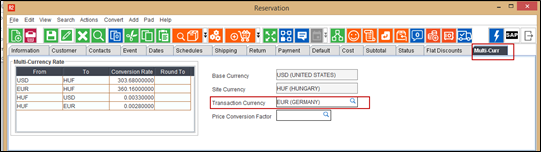
Below sample Workflow shows the currency Conversion of HUF (Hungary) to EUR (Germany).
In Accounts module, while creating an order change the transaction currency in Multi Currency section.
Add the items, enter Unit Price and Discount (if needed) for each item line in the order.
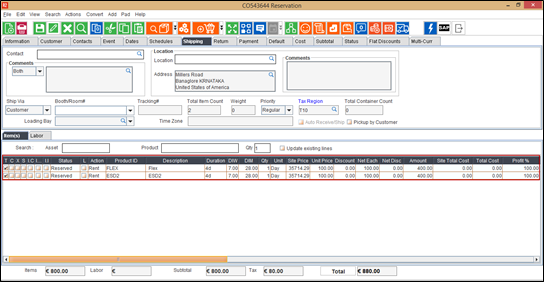
Note: Ensure to tag Tax region.
Invoice the order.
In the Invoicing module, enter the UDF 'Exchange Rate Date' value for the generated Invoice.
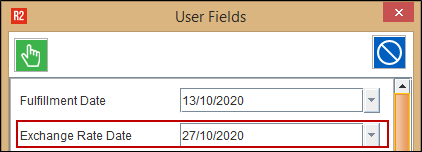
Note: System always refers to the UDF with name matching with ‘Exchange Rate Date’ for printing the exchange rate applicable.
Add the invoice to a batch and then post the batch.
In Accounts module, Go to View > Invoices.
Search the Invoice and click Print.
Select the form and then click the Print.
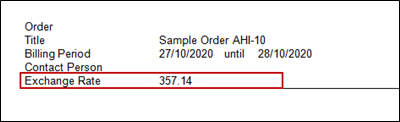
Open the Invoice print and it shows the Exchange Rate.
Note:
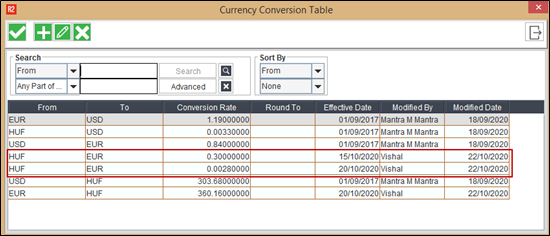
Exchange Rate will be picked based on the Currency Conversion Table (HUF to EUR currency conversion (See Figure 1.0))
However, system does not show the exact Exchange Rate in the print and does the Inverse of Conversion rate i.e., 1/Conversion Rate based on the Conversion Table.
For example:
If we look into the Currency Conversion table, there are two lines available for the same currency conversion HUF to EUR (See Figure 1.0).
System picks the previous effective date from the conversion table which is near to Exchange Rate Date value entered in the Invoice.
As shown in Figure 5.0, the exchange Rate date is 27/10/2020. System looks for the previous effective date in currency conversion table i.e 20/10/2020 (See Figure 1.0) .The conversion rate will be 0.00280000.
Then system does inverse of Conversion rate i.e. 1/0.00280000. Hence the Conversion in the print shows as ‘357.14’.
If the Exchange Rate Date UDF is blank, then the Exchange Rate that was supposed to print in the Invoice shows blank.
System rounds the Exchange Rate to two decimal places in Invoice Print.
In instances of Summary Invoice, the Transaction Currency is defined on the Summary Invoice and the Site Currency will be pulled from the site record linked to the Summary Invoice. When Currency of the Summary Invoice's site is blank, system considers base currency as Site Currency.
When multi-currency is not enabled, system prints blank.
When Site to Transaction Currency (Example: HUF- EUR) conversion rate does not exist, then system prints Blank.
More Info: