Reference No: R2-15892
Version No: 06.01.07-00
Details
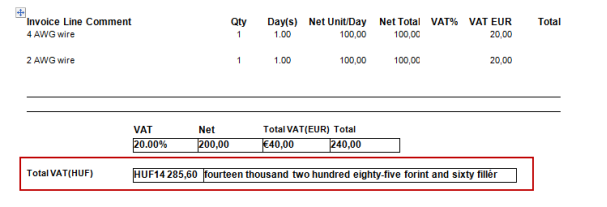
Support to print total Invoice Tax Amount in Posting Currency in Invoice prints.
|
CID |
Description |
Invoice Type |
|
1281 |
Print total Invoice Tax Amount in Posting Currency in Invoice prints |
All Types |
Notes:
This is supported only when Multi-currency = True.
Total Invoice Tax Amount in Posting Currency will be as per the Conversion Rate (1/(Posting Currency => Transaction Currency)) for the date set in Invoice UDF named ‘Exchange Rate Date’.
Posting Currency is Site UDF. And it must be of type Text and key in the matching Currency ID, for the CIDs to work
Do the Form setup in the Maintenance Module.
Ensure Currency Conversion is set for Site Currency to Transaction Currency. (Path: Configuration > Multi Currency > Currency Conversion Setup).
Ensure that Posting Currency has been defined in Maintenance Module.

In Accounts module, add the items, enter Unit Price for each item line in the order.
Note: Ensure to tag Tax region (20% tax is considered for the sample workflow).
Invoice the order.
In the Invoicing module, enter the UDF, ‘Exchange Rate Date’ value for the generated Invoice.
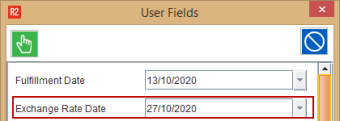
Note: CID 1281 always looks for Conversion Rate applicable for the Date set in respective invoice UDF named ‘Exchange Rate Date’ to print.
Add the invoice to a batch and then post the batch.
In Accounts module, Go to View > Invoices.
Search the Invoice and click Print button.
Select the form and then click the Print button.
Open the Invoice print and it displays the Total Invoice Tax in Posing Currency using the Conversion Rate (1/(Posting Currency => Transaction Currency)) for the Date set in respective invoice UDF named ‘Exchange Rate Date’.