Content was last updated in 06.22.04-00
Go to Configuration Module >> General Tab >> Click Valid Till Offset setup button.
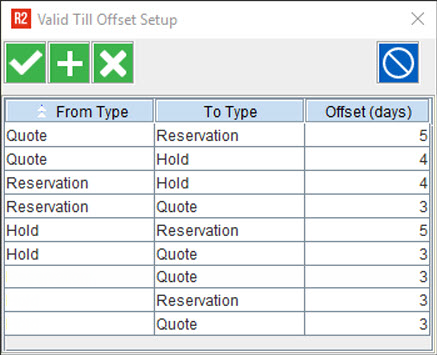
In the 'Valid Till Offset Setup' dialog box, click on the 'Add' button.
Select the 'From Type' and 'To Type' from the respective drop-down list and give 'Offset (days)' value.
Repeat the above step to add multiple 'From Type' and 'To Type' values with their corresponding 'Offset (days)' value.
To add 'Valid Till Offset' for an order creation instance, leave the 'From Type' as blank, and select the order type in 'To Type'.
Validations done while setup
The default value defined for 'Offset (days)' is zero.
The following scenarios will throw error.
If you try to set a 'Negative' value for 'Offset (days)'.
If you try to add multiple entries for the same pair of conversion.
If you try to add a conversion between same 'From Type' and 'To Type' value.
If you try to give a 'Fractional' value for 'Offset (days)'.
If you try to give an 'Non-numeric' value for 'Offset (days)'
Click 'Ok' to save the list. Click 'Close' button or just tab-out from the window, to exit.
Once you have added several 'Valid Till Offset' settings, the dialog box should look like the following.