View Affected Orders - Due to Modification of Return
Dates
Content was last updated in 06.22.02-00
Revision
History
You can now view how changes in the
start/end dates of any rental order, can affect other rental or transfer
order, not just in the same site but at other sites as well.
This conflict arises when the Order
dates are changed, it alters the availability of the items, since
the required quantity is no longer available on the expected dates; the
shortfall subsequently restricts other order from being fulfilled..
The
same information can be viewed under Affected Orders, in Accounts module.
Pre-requisites
Create four sites: San Jose, London, Berlin, and
Auckland.
Create stock
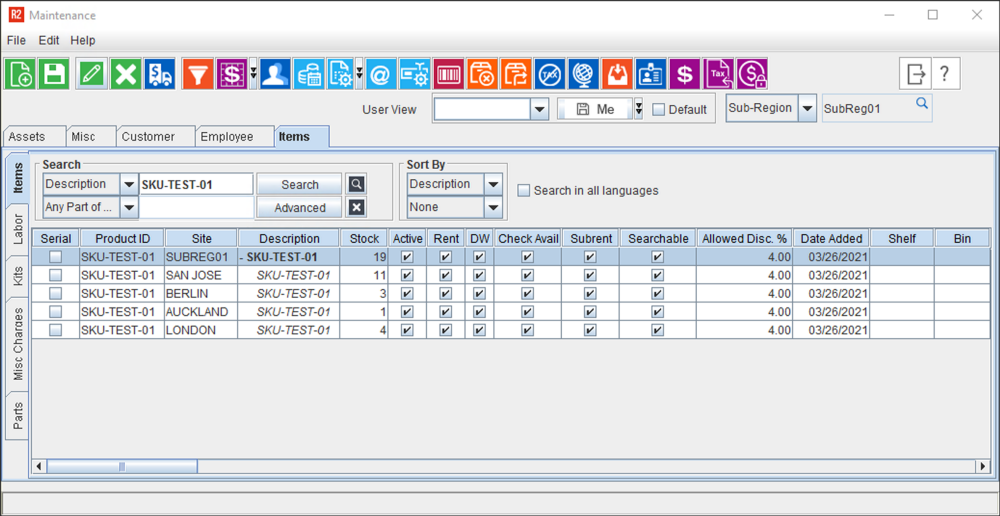
[SKU-TEST-01] at each of the
sites as: San Jose (11), London(4), Berlin(3),
and Auckland(1). See
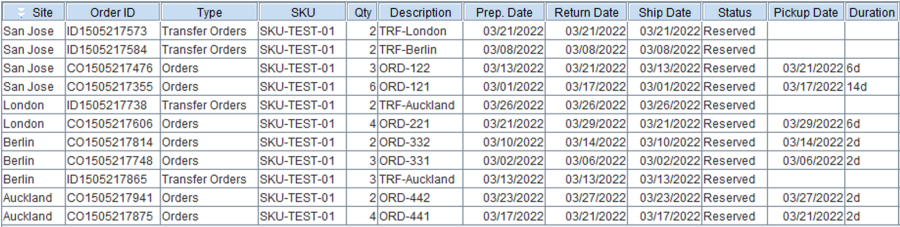
Create orders
at each of the sites as per details given in the following table
Process
these Orders to Out, Filled, or Overdue status.
This
clause ensures that the items are actually out from the Site's inventory,
and only the residual stock at the site is considered for any subsequent
Order created or any existing Order modified. These Orders are termed
as Inflicting Orders.
Linguistically speaking, they are the source/reason of the shortfall trouble,
and are imposing (making the impact happen) the shortfall on other Orders.
Table
2.0 Initially Created Scenarios
Initial Situation:
No
return dates are changed |
Order
Site |
Order
Type |
Order
Qty |
Order line Prep-Return Dates |
Result(s) |
1 |
2 |
3 |
4 |
5 |
6 |
7 |
8 |
9 |
10 |
11 |
12 |
13 |
14 |
15 |
16 |
17 |
18 |
19 |
20 |
21 |
22 |
23 |
24 |
25 |
26 |
27 |
28 |
Remaining Qty @
Site >>> |
11 |
5 |
5 |
5 |
5 |
9 |
5 |
3 |
3 |
3 |
3 |
3 |
3 |
0 |
0 |
0 |
6 |
6 |
6 |
6 |
7 |
7 |
7 |
7 |
7 |
7 |
7 |
7 |
Since
there is NO short-fall of quantity
at any site on any given day, all the Rental Orders and Transfer
Orders get processed without any hindrance. |
San Jose |
Rental |
6 |
|
ORD-121 |
|
|
|
|
|
|
|
|
|
|
|
|
|
Rental |
3 |
|
|
|
|
|
|
|
|
|
|
|
|
|
ORD-122 |
|
|
|
|
|
|
|
|
|
Transfer |
2 |
|
|
|
|
|
|
|
|
|
|
|
|
|
|
|
|
|
|
|
|
TRF-London |
|
|
|
|
|
|
Transfer |
2 |
|
|
|
|
|
|
|
TRF-Berlin |
|
|
|
|
|
|
|
|
|
|
|
|
|
|
|
|
|
|
Remaining
Qty @ Site >>> |
4 |
4 |
4 |
4 |
4 |
4 |
4 |
4 |
4 |
4 |
4 |
4 |
4 |
4 |
4 |
4 |
4 |
4 |
4 |
4 |
6 |
2 |
2 |
2 |
2 |
0 |
0 |
0 |
London |
Rental |
4 |
|
|
|
|
|
|
|
|
|
|
|
|
|
|
|
|
|
|
|
|
|
ORD-221 |
|
Transfer |
2 |
|
|
|
|
|
|
|
|
|
|
|
|
|
|
|
|
|
|
|
|
|
|
|
|
|
TRF-Auckland |
Remaining
Qty @ Site >>> |
3 |
3 |
0 |
0 |
0 |
3 |
3 |
5 |
5 |
5 |
3 |
3 |
0 |
2 |
2 |
2 |
2 |
2 |
2 |
2 |
2 |
2 |
2 |
2 |
2 |
2 |
2 |
2 |
Berlin |
Rental |
3 |
|
|
ORD-331 |
|
|
|
|
|
|
|
|
|
|
|
|
|
|
|
|
|
|
|
|
|
|
|
|
Rental |
2 |
|
|
|
|
|
|
|
|
|
|
ORD-332 |
|
|
|
|
|
|
|
|
|
|
|
|
|
|
|
|
Transfer |
3 |
|
|
|
|
|
|
|
|
|
|
|
|
TRF-Auckland |
|
|
|
|
|
|
|
|
|
|
|
|
|
Remaining
Qty @ Site >>> |
1 |
1 |
1 |
1 |
1 |
1 |
1 |
1 |
1 |
1 |
1 |
1 |
4 |
4 |
4 |
4 |
4 |
0 |
0 |
0 |
4 |
4 |
4 |
2 |
2 |
4 |
4 |
6 |
Auckland |
Rental |
4 |
|
|
|
|
|
|
|
|
|
|
|
|
|
|
|
|
|
ORD-441 |
|
|
|
|
|
|
|
|
|
Rental |
2 |
|
|
|
|
|
|
|
|
|
|
|
|
|
|
|
|
|
|
|
|
|
|
|
ORD-442 |
|
|
Sample Workflow
Change the
begin/return dates for rental orders as follows.
Table 3.0: Sample
Order Information
Order Site |
Order# |
Original
End Date |
Modified
End Date |
San
Jose |
ORD-121 |
16th |
24th |
|
ORD-122 |
20th |
24th |
Berlin |
ORD-331 |
5th |
15th |
|
ORD-332 |
13th |
15th |
You
can change the dates of the Orders at a site, using any of the following
access points.
Order > Dates Tab
> Edit Dates
Order > Actions
> Change Dates > All Lines/ Selected Lines
Order (Double click)
> Line Edit Dates
Order Search >
Order Dates Edit
Single
Order
Multiple
Order
Also,
ensure that 'View Affected Orders'
checkbox is selected in the window where you had change the return date
for the Order.
Changing the
above dates, disrupts the availability of the items at the four sites,
since the required quantity is no longer available on the expected
dates.
The 'Extension
Duration' of the Order has been depicted as in
the table below.
The 'Impacted
Order' due to short-fall in quantity has been depicted as Red Block in the
table below.
The 'Numbers
in Negative' (in Remaining Qty @ Site row) refer to the shortfall
quantity.
Table 4.0 Scenarios
after dates are modified
Return
dates are changed |
Order Site |
Order Type |
Order Qty |
Order line
Prep-Return Dates (Modified)
|
Result(s) |
1 |
2 |
3 |
4 |
5 |
6 |
7 |
8 |
9 |
10 |
11 |
12 |
13 |
14 |
15 |
16 |
17 |
18 |
19 |
20 |
21 |
22 |
23 |
24 |
25 |
26 |
27 |
28 |
Remaining Qty @
Site >>> |
11 |
5 |
5 |
5 |
5 |
9 |
5 |
3 |
3 |
3 |
3 |
3 |
3 |
0 |
0 |
0 |
0 |
0 |
0 |
0 |
-2 |
-2 |
- 2 |
0 |
9 |
9 |
9 |
9 |
Due
to changed return dates of some order, many other related orders
from the same sites (and even other sites) could not be fulfilled.
This subsequently transitions into affected orders in other sites
as well |
San Jose |
Rental |
6 |
|
ORD-121 |
|
|
|
|
|
|
Rental |
3 |
|
|
|
|
|
|
|
|
|
|
|
|
|
ORD-122 |
|
|
|
|
|
|
Transfer |
2 |
|
|
|
|
|
|
|
|
|
|
|
|
|
|
|
|
|
|
|
|
TRF-London |
|
|
|
|
|
|
Transfer |
2 |
|
|
|
|
|
|
|
TRF-Berlin |
|
|
|
|
|
|
|
|
|
|
|
|
|
|
|
|
|
|
Remaining
Qty @ Site >>> |
4 |
4 |
4 |
4 |
4 |
4 |
4 |
4 |
4 |
4 |
4 |
4 |
4 |
4 |
4 |
4 |
4 |
4 |
4 |
4 |
4 |
4 |
4 |
0 |
-2 |
-2 |
-2 |
-2 |
London |
Rental |
4 |
|
|
|
|
|
|
|
|
|
|
|
|
|
|
|
|
|
|
|
|
|
ORD-221 |
|
Transfer |
2 |
|
|
|
|
|
|
|
|
|
|
|
|
|
|
|
|
|
|
|
|
|
|
|
|
TRF-Auckland |
Remaining
Qty @ Site >>> |
3 |
3 |
0 |
0 |
0 |
0 |
0 |
0 |
0 |
0 |
-2 |
-2 |
-2 |
-5 |
-5 |
2 |
2 |
2 |
2 |
2 |
2 |
2 |
2 |
2 |
2 |
2 |
2 |
2 |
Berlin |
Rental |
3 |
|
|
ORD-331 |
|
|
|
|
|
|
|
|
|
|
|
|
|
|
|
Rental |
2 |
|
|
|
|
|
|
|
|
|
|
ORD-332 |
|
|
|
|
|
|
|
|
|
|
|
|
|
|
|
Transfer |
3 |
|
|
|
|
|
|
|
|
|
|
|
|
TRF-Auckland |
|
|
|
|
|
|
|
|
|
|
|
|
|
Remaining
Qty @ Site >>> |
1 |
1 |
1 |
1 |
1 |
1 |
1 |
1 |
1 |
1 |
1 |
1 |
1 |
1 |
1 |
1 |
1 |
-3 |
-3 |
-3 |
1 |
1 |
1 |
-1 |
-1 |
-1 |
1 |
1 |
Auckland |
Rental |
4 |
|
|
|
|
|
|
|
|
|
|
|
|
|
|
|
|
|
ORD-441 |
|
|
|
|
|
|
|
|
|
Rental |
2 |
|
|
|
|
|
|
|
|
|
|
|
|
|
|
|
|
|
|
|
|
|
|
|
ORD-442 |
|
|
If 'View Affected Orders' checkbox is
selected, then when you attempt to perform the change dates, system
gives you the following prompt.
Figure 3.0 Prompt-1
conforming 'View Affected Orders'

Upon
confirmation, the following prompt is shown,
Figure 4.0 Prompt-2
conforming 'View Affected Orders'

Upon
further confirmation, the Affected Order(s) window are shown (Only if
there are 1 or more orders which gets affected, this window is displayed).
Figure
5.0 List of 'Affected Orders' when 'Return Date' for ORD-121
is modified

Figure
6.0 List of 'Affected Orders' when 'Return Date' for ORD-331
is modified

Important Points
 |
This
feature lists only those Affected Orders for which the status
is - Reserved, Hold, or T-Reserved.
This
clause ensures that the items considered in Affected Orders are
going to be consumed and system expects them to be available in
the inventory.
Subsequently,
when the required quantity is not available, it considered as
a shortfall, and list them out as Affected Orders.
In
case of E-Pool Orders, the site that is considered for checking
conflict is Ship and Return site of the Inflicting line.
In
case of Orders impacted due to an inflicting transfer order,
the system considers a lock-in period of 15-days, from the
first instance of transfer order.
For Example:
Let's consider, an Order from Site A
to Site B cannot be processed (assumed as cancelled) because an
Order at Site A is not getting returned on its original schedule.
Thus subsequently, at Site B, an order
cannot be processed, due to unavailability of required stock quantity.
In such situation, system will consider
ONLY those orders as 'Impacted/Affected Orders' whose ship date
falls within 15 days counting from the ship date of first Impacted/Affected
order at site B.
You
can expand-collapse the line, to show any 2nd level inflicting
order.
For
Example:
Using the scenario from previous example,
both the Transfer order (Site A) and the Return order (Site A)
will be deemed as inflicting orders.
Both of these Orders will appear in an
expand/collapse section (in the inflicting Order column) under
impacted Orders for Site B. See Figure
5.0 and Figure 6.0 |