Content was last updated in 06.23.05-00
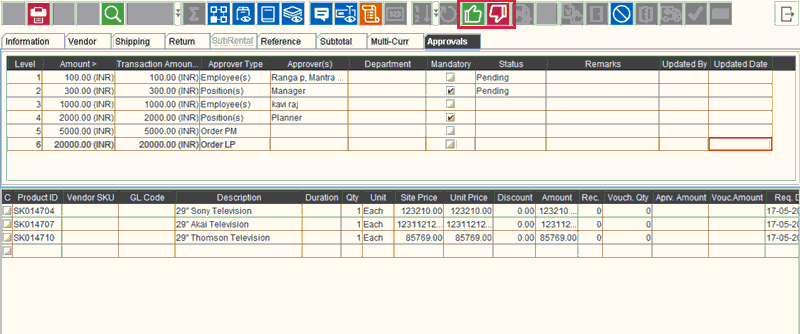
As an approver you can approve/reject a PO in two ways.
When a PO owner releases a PO for approval, an E-mail notification is sent to all the level approvers until the 'First Mandatory Level'.
Once the 'First Mandatory Level' is approved, the subsequent level approvers until the 'Next Mandatory Level' will receive a similar E-mail like the previous one.
This shall continue until the last level has been accomplished.
Each approver (for every level) will have a Approve or Reject hyperlink in the mail, and they can use it to take the required action.
What happens when any of the level approvers Approves/ Rejects the PO, is explains in the sections below.
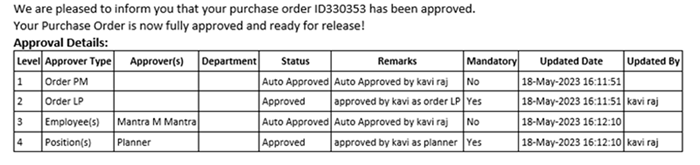
When you approve the PO an e-mail notification sent to the owner of the PO as shown below.
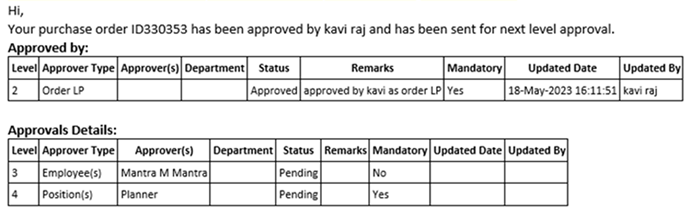
Your approve action will also trigger an e-mail notification to the approvers of subsequent levels simultaneously as shown below.
If you reject an PO, again a notification is sent to the owner of the PO as shown below.
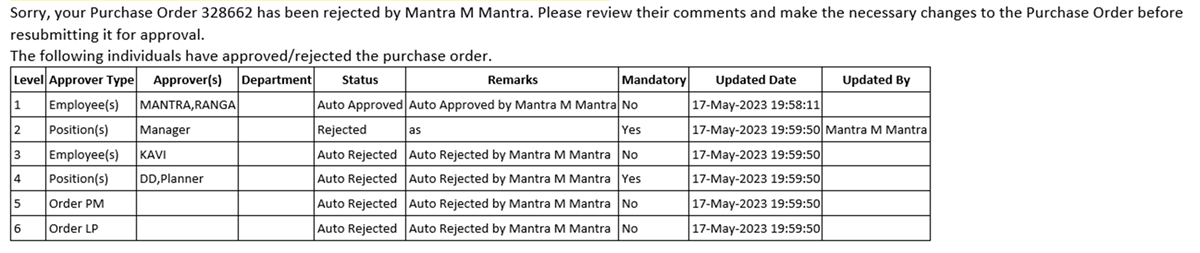
All subsequent levels will be auto-rejected, however, no e-mail notifications will be sent to them.
|
E-mail notifications will work only if you have subscribed to BI module and have all the rules appropriate setup. If your E-mail notifications are not working or you haven't subscribed to the BI module, please contact your respective UBS PM for more assistance. |
